TL;DR
The traditional rule that DIY is always cheaper no longer applies in 2026. Prebuilts now often match or beat DIY on cost, while offering faster deployment, robust support, and validated thermals. Your choice depends on your need for speed, control, and how much effort you’re willing to invest.
Imagine this: you’re ready to jump into AI development, but the decision to build or buy your workstation keeps you stuck. A decade ago, building your own was the no-brainer — cheaper, customizable, more control. But in 2026, that’s no longer the case.
The AI boom, supply chain issues, and bulk buying by vendors have shifted the landscape. Now, the real question isn’t just about saving a few bucks but whether you want speed, support, or total control. This guide breaks down what matters most in your decision and shows you how to pick what’s right for your workload and skill level.
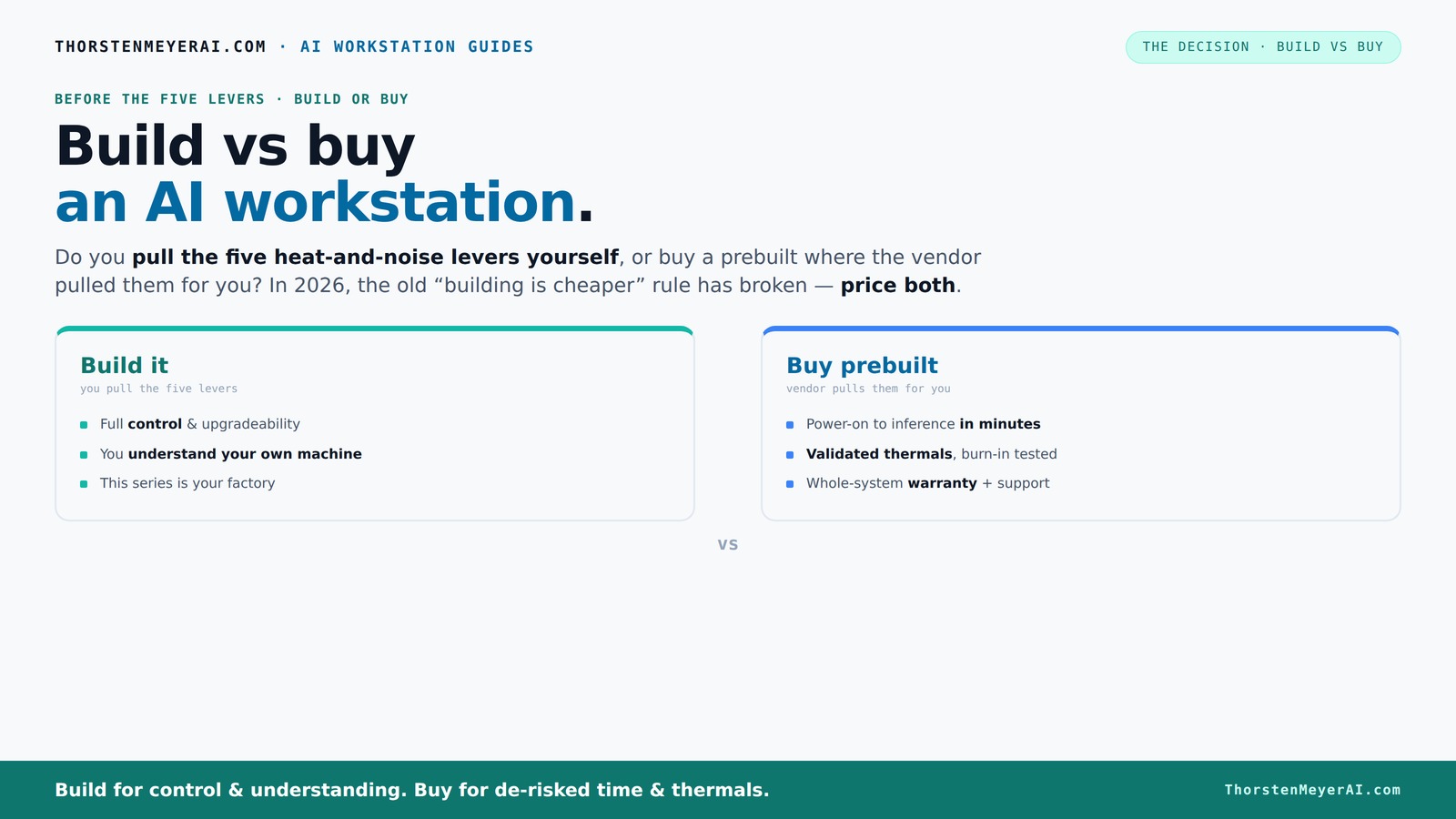
Build vs buy
an AI workstation.
The real question behind this whole series: do you pull the five heat-and-noise levers yourself, or buy a prebuilt where the vendor pulled them for you? And in 2026, the old “building is cheaper” rule has broken. Match your situation in Part 3.
Key Takeaways
- Component shortages and market inflation have leveled the playing field, often making prebuilts as affordable as DIY builds in 2026.
- Prebuilts offer validated thermals, warranties, and near-instant deployment — ideal for time-sensitive projects.
- Building your own gives you maximum control over hardware, cooling, and noise, but demands time, skill, and troubleshooting patience.
- Hybrid strategies—buying a system then customizing it—combine speed and control, fitting many AI workflows perfectly.
- Always compare total cost of ownership. A cheap part isn’t worth it if it costs days of your time or leads to downtime.
As an affiliate, we earn on qualifying purchases.
Why Building Is No Longer the Cheaper Default in 2026
Building your own AI workstation used to be a clear-cut way to save money. Today, component shortages and inflation have changed that. DDR5 RAM, GPUs, and SSDs cost more because supply chains can’t keep up. A build that used to cost under $1,000 now often hits $1,250+.
Meanwhile, big vendors like Dell, BIZON, and Puget Systems have bought in bulk, locking in lower prices. They pass some savings to you with prebuilt systems that include testing, assembly, and support. This shift means that the cost advantage of DIY is diminishing, especially when factoring in the time and effort involved. If you value a quick setup and reliable support, prebuilts often come out ahead financially and practically.
For example, a high-end AI workstation with a 4090 GPU, 128GB RAM, and fast SSDs might cost around $3,000 when built DIY today. The same spec from a reputable vendor could be just as much or less once you consider support, warranties, and the time saved in setup, highlighting how recent market conditions have balanced or tilted the cost scales.
As an affiliate, we earn on qualifying purchases.
The Five Levers of Thermal and Noise Control — Who Handles Them?
Running an AI workstation smoothly means managing heat, noise, and power. It’s like tuning a race car — pull the right levers, and your machine runs cooler, quieter, and faster. The choice between building and buying hinges on who pulls these levers and how effectively.
Buy a prebuilt — the vendor pulls them. They validate thermals, tune fans, and often include water-cooling that hums softly under load. Systems from Lambda or BIZON are tested for hours before shipping, ensuring no thermal throttling and less noise. This means you get a machine optimized for performance and quiet operation right out of the box, reducing the risk of overheating or excessive noise that can hamper productivity or damage components.
Build it yourself — you pull the levers. You choose quiet GPUs, undervolt, pick the right case, install sound-dampening materials, and fine-tune fan curves. This gives you exact control to match your noise and heat targets, but it requires time, expertise, and a good understanding of thermal dynamics. Poorly managed thermals can lead to thermal throttling, reducing performance, or excessive noise, which can be distracting or cause hardware wear over time. The tradeoff is the potential for a perfectly tuned system but with increased effort and risk of misconfiguration.
For example, a prebuilt might run at 65°C and 35dB under load, while a self-tuned build could push to 60°C at 30dB. The choice depends on whether you want to spend time tuning for optimal quiet and thermal performance or prefer a ready-to-go system that guarantees these aspects without additional effort.
As an affiliate, we earn on qualifying purchases.
Cost Comparison: Build vs Buy in 2026 — The Real Numbers
| Aspect | Build Your Own |
|---|---|
| Hardware Cost | Typically $2,500–$3,000 for a high-end AI setup with GPU, CPU, RAM, SSDs |
| Time & Effort | 20–40 hours of sourcing, assembly, troubleshooting |
| Support & Warranty | Own troubleshooting, limited warranty unless paid separately |
| Aspect | Buy Prebuilt |
|---|---|
| Hardware Cost | Often $2,800–$3,200, including assembly, testing, and warranty |
| Time & Effort | Minutes to set up, plug in, and start training |
| Support & Warranty | Included, with options for extended coverage (up to 5 years) |
As an affiliate, we earn on qualifying purchases.
When to Choose a Prebuilt — Speed, Support, and Confidence
If you need to get started yesterday, a prebuilt is your best bet. It arrives ready, with software stacks like CUDA, TensorFlow, and Docker preinstalled, so you can jump straight into training or inference.
Support is another big win. Vendors validate thermals, run stress tests, and provide warranties. If a component fails during a critical job, you’re covered. For example, Lambda offers a 3-year warranty with on-site support, eliminating the headache of troubleshooting hardware issues yourself.
High-end multi-GPU setups are tricky to tune. Vendors like Puget optimize power delivery and cooling, which reduces risk and downtime. For teams that can’t afford delays, prebuilts are a reliable, ready-made solution.
Why Building Your Own Might Still Make Sense
If you love tinkering or need a super-custom setup, building remains attractive. You select each component — from the quiet GPU to the overclocked CPU — and tune everything for your workload.
For instance, you might want a system with multiple RTX 4090 cards, custom water-cooling, and a specific motherboard. Building allows you to optimize for performance and noise, often resulting in a machine that better fits niche needs. This level of customization can lead to better thermal management, quieter operation, and the ability to upgrade specific components as needs evolve, which is especially valuable for users with unique or demanding workloads.
Plus, if you’re comfortable with troubleshooting, you can upgrade or replace parts easily, extending your system’s lifespan. For hobbyists and students, the process itself can be educational and satisfying, fostering a deeper understanding of hardware and performance tuning that can pay dividends in future projects or career development.
The Hybrid Approach: Buy, Then Customize
Many AI teams are adopting a middle ground. They buy a solid prebuilt as a base — saving time and ensuring reliability — then customize the software stack, cooling, or expansion options. This approach balances the benefits of professional validation with the flexibility of customization.
This hybrid method allows you to start with a dependable system and tailor it to your specific needs without the full investment of building from scratch. For example, you might buy a prebuilt with a 4090 GPU, then undervolt it (see [undervolt GPU](https://thorstenmeyerai.com/undervolt-gpu-local-inference/)) for quieter operation, or add custom fans for better airflow. This strategy reduces initial setup time, minimizes risk, and often results in a more cost-effective solution that can be upgraded or modified over time.
Frequently Asked Questions
Is it cheaper to build or buy an AI workstation in 2026?
While building has traditionally been cheaper, recent market shifts mean prebuilts often match or beat DIY prices when factoring in time and support. However, the real savings depend on specific configurations, labor costs, and your comfort with troubleshooting. Carefully compare total ownership costs, including support and potential downtime, to determine the best value for your needs.
How quickly can I start training if I buy a prebuilt?
Most prebuilts arrive with software stacks like CUDA and TensorFlow preinstalled, enabling you to begin training within minutes of setup. DIY setups, on the other hand, may require hours or days to install, configure, and troubleshoot software and drivers, making prebuilts a more immediate solution for time-sensitive projects.
What support do I get with a prebuilt AI workstation?
Reputable vendors include warranties, stress testing, and dedicated support channels. This means faster resolution of hardware issues, reduced downtime, and peace of mind, especially during critical training or inference runs. Support options can extend up to several years, offering continued reliability as your workload grows.
Can I upgrade a prebuilt later?
Yes, but the extent depends on the design. High-end prebuilts often support upgrades like additional RAM, newer GPUs, or storage, but some models may have limited expansion slots or proprietary components. Always review upgradeability before purchasing to ensure it aligns with your future needs.
Does cloud GPU rental make more sense than a local workstation?
It depends on your workload frequency and budget. For ongoing, intensive training, owning a local workstation often provides better long-term value and lower latency. However, for sporadic or short-term projects, cloud GPU rental offers flexibility without upfront hardware costs. As prices and support for local hardware improve, the decision increasingly hinges on workload patterns and operational preferences.
Conclusion
In 2026, the old rule of 'build cheaper' no longer holds. Support, speed, and reliability often outweigh the last few dollars saved building yourself. Your decision hinges on whether you value control or convenience — and how fast you need to start training.
Imagine a machine tuned perfectly to your needs, humming quietly in your workspace, ready to unleash AI magic the moment you power it on. That’s the real goal — whether you build or buy, make sure it’s the right fit for your workload and your life.